Trade your Edge.Improve with Insights.
Turn your trade history into a competitive advantage. Discover the exact setups and risk behaviors impacting your bottom line.
Built for futures, forex and prop-firm traders.
- Find your best setups
- Auto-sync your trades
- See what mistakes cost
Product tour
Every screen answers a question
Click through the app before you sign up. These are real screens, filled with sample trades.
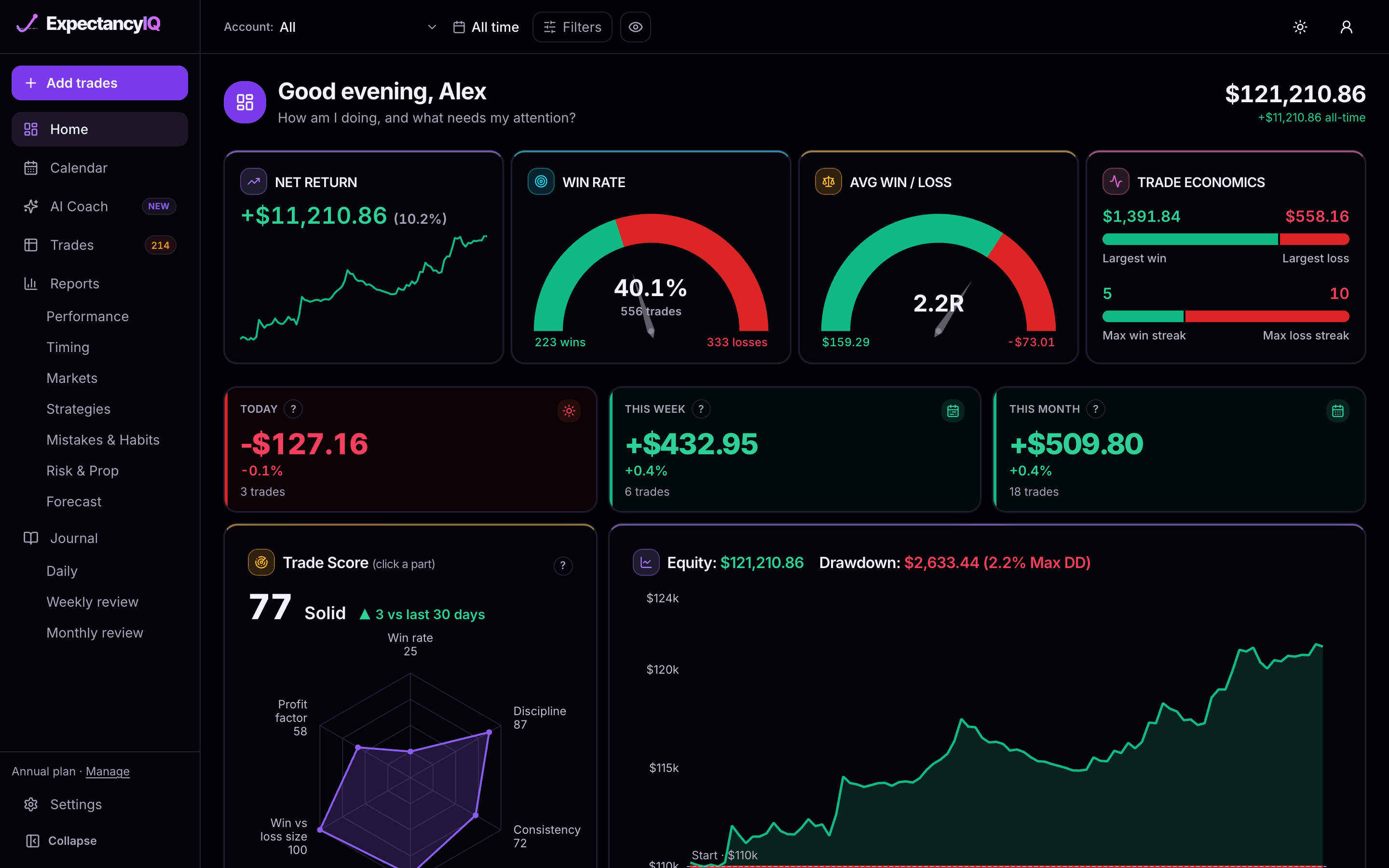
How am I doing, and what needs my attention?
- Net return, win rate and average win vs loss at a glance
- Today, this week and this month
- Trade Score, equity curve and drawdown
Questions your journal answers
Ask your trades the questions that matter
Each Report section is titled as the question it answers. Here are six, with the charts that answer them.
Which setup earns most?
Reports › Strategies
When do I trade best?
Reports › Timing
What is each mistake costing me?
Reports › Mistakes & Habits
Do my rules pay?
Average per trade · Mistakes & Habits
Which days pay?
Reports › Timing
Will I pass my challenge?
Reports › Forecast (Pro)
Figures from the app's sample account.
Trade Score · included free
One number for how real your edge is
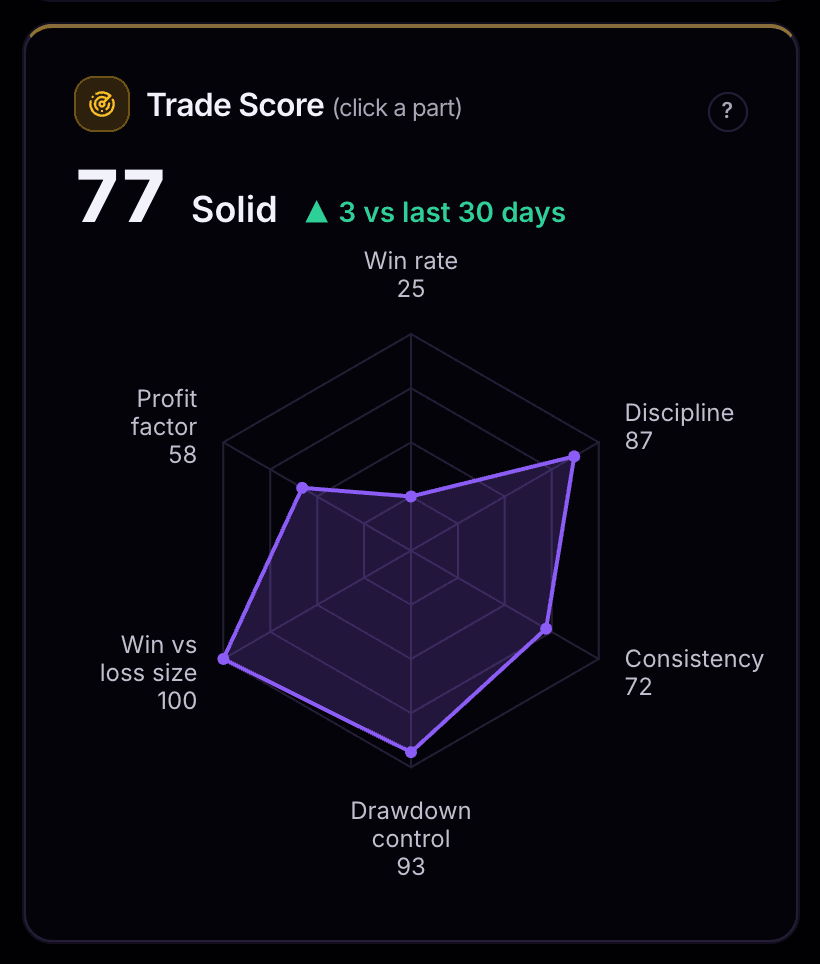
The Trade Score rates your trading from 0 to 100 across six parts, then reads Weak, Developing, Solid or Strong, with its change over the last 30 days. A losing record can never score above 59, so tidy habits can't hide a losing account.
Win rate
how often you win
Profit factor
money won for every dollar lost
Win vs loss size
your average win against your average loss
Drawdown control
how deep your drawdowns go and how fast you recover
Consistency
whether one big day carries the rest
Discipline
clean trades, loss limits, tilt, sizing and rules followed
Every formula is on the methodology page.
What Pro adds
A coach that knows your numbers
Five levels of AI coaching, from a single trade to your whole history, plus the tools that need all of your data.
AI Coach
Every answer is built only from figures the app has already worked out from your trades. When a figure is missing, the coach says what to log instead of guessing.
- Trade
“Did I follow my plan here?”
A written review of the trade and one thing to do next time.
10 a month
- Day
“How did today go?”
A three-line summary of your day, tilt and overtrading included.
10 a month
- Week
“Am I improving?”
A report card graded A to F, with three actions for next week.
Every week, automatic
- All-time
“What are my strengths and leaks?”
A summary of your patterns with two to four action items.
From 50 trades, 5 refreshes a month
- Ask
“Why did I lose last week?”
A real conversation about your own figures, with follow-ups.
10 questions a month

Your whole history
Free stats cover your last 60 days. Pro counts every trade you have ever imported, so long-run edges and slow leaks show up.
Forecast
1,000 simulated runs of your own trades: your chance of hitting the profit target before you bust the drawdown.
All 53 charts
The deep dives unlock: day × hour heatmaps, strategy × symbol, rolling 20 trades, cost by month, hold time vs P&L and mistakes over time.
How it works
Import → Review → Improve
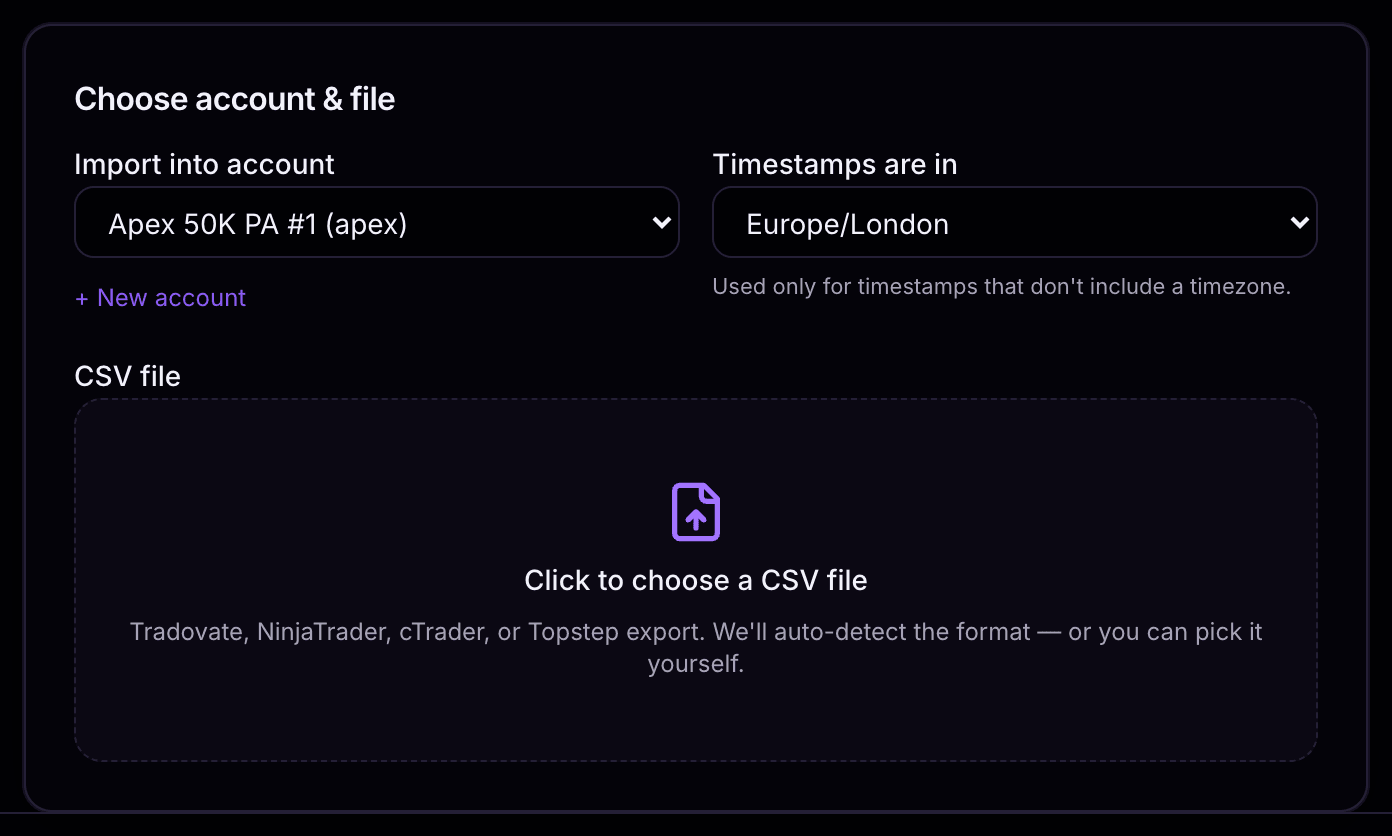
Drop in your export. We handle the platform quirks.
Tradovate, NinjaTrader, cTrader and Topstep files are detected and mapped for you, fills are matched into trades with their exact commission, and you see every trade before anything is saved. On Pro, a connected cTrader account syncs on its own.
Product highlights
Automatic cTrader sync · Pro
Connect cTrader once. Every closed trade shows up on its own.
No export, no upload, no remembering to do it on Friday. Authorize your cTrader account once and closed trades import themselves — whenever you open the app and daily in the background — with commission and swap intact. Access is read-only: ExpectancyIQ can never place or modify a trade. CSV import stays available on every plan and for every other platform.
Last synced
Imported today
Risk & Prop · Forecast
Know your prop-firm risk before it knows you.
Set each account's own rules once: static, trailing end-of-day or trailing intraday drawdown, daily and max loss limits, profit target and consistency. Risk & Prop shows your distance to bust and every breach. On Pro, Forecast replays your own results 1,000 times to show your chance of passing versus busting.
Chance of busting
Hits profit target
Why traders choose ExpectancyIQ
Precision, not a generic port
Session-aware timing (CME/Globex hours, the 17:00 CT trading-day roll), tick/point-native futures math, and fractional CFD/forex lot sizing — real market mechanics, not a one-size-fits-all approximation.
Dark-first, built for traders' screens
You live in dark trading platforms all day — ExpectancyIQ's default theme matches, not an afterthought light-mode-first design.
Your balance, verified
A deposits/withdrawals ledger and a running per-trade balance column let you bisect your journal against a broker or prop-firm statement — plus per-account currency for non-USD funded accounts.
Exact commission, not a rate guess
Fills-based FIFO import gives ground-truth commission per trade — most journals approximate it from a flat rate.
Reviews
What traders say
Real reviews from traders who used ExpectancyIQ on their own trade history — published as written, including the criticism.
Individual results. Trading involves risk and past performance does not guarantee future results — see our Risk Disclosure.
Pricing
Start free. Go Pro for the coach.
Journal every trade, review every day and see what your trading really looks like, free for 14 days with no credit card. Pro adds an AI coach built from your own numbers, your full history and the deepest charts.
Free trial
$0
14 days, no credit card. Then your account stays open read-only.
Everything you need to journal and review:
- Home dashboard and P&L Calendar
- Phone and desktop app: install it from your browser
- Performance analytics
- 43 charts across 6 Reports
- Trade Score: one 0–100 rating of your edge
- System quality: Sharpe, Sortino and Calmar
- Prop-firm risk: drawdown, loss limits and consistency
- Complete trading journal
- Every trade: setup, plan, execution and mindset
- Daily journal with a pre-market plan
- Weekly and monthly reviews
- Stats on your last 60 days
- 1 trading account
- CSV import from every supported platform
- 20 trade screenshots a month
- Export all your data, anytime
Pro · annual
$1.90/week
$99/year $132 — save $33 · less than one round-turn commission a week.
25% off until October 12 — keep this price for as long as you stay subscribed.
Everything in Free, plus:
- AI Coach
- AI summary
- Weekly report card
- Deep insights into trading patterns
- Trade reviews: a written critique of each trade
- Day summaries of how your session went
- Ask AI questions about your own results
- All-time stats
- All 53 report charts, including the deep dives
- Forecast: your chance of passing vs busting
- Every insight unlocked
- Automatic cTrader sync
- Up to 5 trading accounts
- Unlimited trade screenshots
Compare plans
Every feature, side by side
Free covers journaling, reviews and most of your stats. Pro adds the coach, your full history and the deepest charts.
| Feature | Free trial | Pro |
|---|---|---|
| Getting trades in | ||
| CSV import: Tradovate, NinjaTrader, cTrader, Topstep, any broker's CSV | ||
| Auto-detect the file, undo any import | ||
| Trading accounts | 1 | 5 |
| Automatic cTrader sync | ||
| Export all your data | ||
| Seeing your results | ||
| History your stats cover | Last 60 days | All time |
| Phone and desktop app (iPhone, Android, Windows, Mac) | ||
| Home: tiles, Today / Week / Month, equity and drawdown | ||
| Calendar with week totals | ||
| Trade Score: 0–100 from 6 parts, with 30-day change | ||
| Reports: Performance, Timing, Strategies, Markets, Mistakes & Habits, Risk & Prop | 43 of 52 | All 52 |
| Deep dives: day × hour heatmaps, strategy × symbol, rolling 20 trades, mistakes over time and more | Preview | |
| System quality (Sharpe, Sortino, Calmar) and trade quality | ||
| Prop firms and risk | ||
| Drawdown rules: static, trailing end-of-day, trailing intraday | ||
| Daily and max loss limits, distance to bust, consistency, profit target | ||
| Forecast: chance of passing vs busting, 1,000 simulated runs | ||
| Reviewing trades and days | ||
| Trades list: search, quick filters, bulk edit, CSV export | ||
| Trade view: plan vs actual, trade flags, cost breakdown, grade | ||
| Journal each trade: setup, plan, execution, mindset, notes, tags, mistakes | ||
| Trade screenshots | 20 a month | Unlimited |
| Daily journal, weekly and monthly reviews, searchable entries | ||
| Coaching | ||
| This week vs last, day flags for tilt, overtrading and loss limits | ||
| Insight cards, focus list, strengths and leaks | First 2 | All |
| AI Coach · Trade: a written review of the trade and one thing to do next time | ||
| AI Coach · Day: a three-line summary of your day, tilt and overtrading included | ||
| AI Coach · Week: a report card graded A to F, with three actions for next week | ||
| AI Coach · All-time: a summary of your patterns with two to four action items | ||
| AI Coach · Ask: a real conversation about your own figures, with follow-ups | ||
14-day free trial
No credit card required. After 14 days your account stays open read-only — your trades and stats are still there to view until you subscribe.
Billed securely via Stripe
We never see or store your card number. Payment runs through Stripe, the same processor used by millions of businesses.
Cancel anytime, no contact needed
Manage or cancel your subscription yourself in Settings → Billing — one click, no support ticket required.
Charged wrong? We fix it.
If you're billed in error or charged twice, contact us and we'll review it — see our refund policy for details.
FAQ
Questions traders ask before getting started
Straight answers on importing, supported markets, pricing, and what happens to your data.
Need a specific answer?
What is ExpectancyIQ?
What markets and trading styles does ExpectancyIQ support?
What brokers and platforms can I import from?
Do you support live broker sync?
What is the Forecast (risk simulator)?
What's included in the free trial?
What does Pro add, and how much does it cost?
What does the AI Coach do, and what does it see?
Is there a free trial?
Can I cancel anytime, and do you offer refunds?
Can I export my data out of ExpectancyIQ?
Is my trade data private?
Start with your next import
Your next trades are data.
Start capturing them.
Import your first CSV in minutes and see which setups, sessions, and habits are actually driving your P&L.
Free for 14 days, then read-only · Analytics only, never signals